
Using SEO MCP servers for your website SEO improvement is the best way to speed up your overall efforts. By using such model context protocols, you don’t need to copy and paste data from one tool to another.
We’ve researched and found 8 best MCP servers for your SEO workflow. I’m sure you’re using one of two tools, you can easily integrate their MCPs and you’re good to go.
You can use these servers to pull the data from your favorite SEO tools, backlinks tools. Or even you can also connect with Google search console and more.
Quick Overview: Which SEO MCP is best for you?
- Best overall: SE Ranking – 180+ tools + 5.5B keywords + 188 countries
- Best for SaaS: DataForSEO – pay as you go, works with 7 different AI clients
- Best for agencies: Semrush or SE Ranking
- Best for freelancers: GSC + GA4 (just free stuff)
- Best for SERPs: DataForSEO – real-time SERP data at scale
- Best for backlinks: Ahrefs – 35 trillion backlinks, 456.5B pages indexed
- Best for audits: SEOptimer – 100+ checks done in 20 seconds
- Best for connecting everything: Coupler.io – 437 integrations
Best SEO MCP Servers: Quick Comparison Table
Here’s the whole list side by side
| MCP server | Best for | Key data | Deployment | Starting price |
| SE Ranking MCP | Full-stack SEO in one connection | Keywords, backlinks, rank, audits, AI visibility | Remote | $129/month (or $50 pay-as-you-go) |
| GSC MCP (mcp-gsc) | Free first-party search data | Clicks, impressions, CTR, position, indexing | Local (or hosted) | Free |
| DataForSEO MCP | Raw SERP and keyword data at scale | Multi-engine SERP, keywords, backlinks, on-page | Remote / self-host | $50 deposit, ~$0.0006/query |
| SEOptimer MCP | Fast technical audits | Site audits, Core Web Vitals, on-page scoring | Remote | ~ starts $39/month |
| Google Analytics MCP | Traffic and conversion data | Sessions, engagement, conversions, sources | Local (or hosted) | Free |
| Coupler.io MCP | Combining SEO with other data | GSC, GA4, ads, CRM, 400+ sources | Remote | Free tier |
| Semrush MCP | Enterprise competitive intelligence | Keywords, backlinks, PPC, market trends | Remote | $199/month |
| Ahrefs MCP | Deep backlink research | Backlinks, keywords, rank, Site Explorer | Remote | $129/mo |
What is MCP for SEO and what can it do?
An MCP server is a connector that lets your AI assistant pull live data from a tool. Instead of exporting a CSV and pasting it into a prompt, you ask a question and the assistant fetches the data itself.
For SEO, that means you can:
- Find and group keywords.
- Compare your site with competitors.
- Find backlink gaps and lost links.
- Track ranking changes by location and device.
- Check your brand’s AI search visibility.
- Find and prioritize technical SEO issues.
- Pull data from GSC and GA4 without opening dashboards.
How we tested these MCP tools for SEO
We looked at each MCP server from a practical SEO point of view, going through their features, pricing, documentation, and reviews from people who have used them.
We compared them on five things:
- Data depth: How much useful SEO data you can access.
- Real cost: What you actually need to pay, including credit limits.
- Setup: How easy or technical the setup is.
- AI support: Which tools it works with, like Claude, ChatGPT, Cursor, and Gemini.
- Best use case: Who will get the most value from it.
You’ve probably seen the “awesome MCP servers” lists on GitHub. They’re huge, but they don’t tell you what fits SEO.
Most “best MCP servers” roundups have the opposite problem. They’re written by the tool’s own vendor, so they rank themselves first.
Here you’ll get both the good and the bad for every server, so you can choose based on what you actually need.
The Best MCP Servers for SEO In 2026
1. SE Ranking MCP: Best all-in-one SEO MCP
Best for: Agencies and in-house teams that want one connection to cover everything.
SE Ranking MCP is one of the most complete SEO MCP servers you can use. It connects your SE Ranking account with AI assistants like ChatGPT, Claude, Cursor, and Gemini CLI.
Once connected, your AI assistant can work with live SEO and GEO data from your account. You can ask it to check keywords, analyze competitors, find backlink gaps, review site audits, or look at your visibility across AI search.
It gives you 180+ tools through one remote connection, so there’s no local setup. You also get 26 Skills (25 installed via plugin, 1 need a manual clone) for ready-to-use SEO workflows. Plus 100K free credits during the trial to test it before paying.
What it can do:
- Keyword research across a 5.5 billion keyword database in 188 countries.
- Competitor gap analysis, top pages, and traffic estimates.
- Backlink audits against 2.2 billion domain profiles.
- Daily rank tracking by device and location.
- Technical site audits with issues sorted by impact.
- AI visibility tracking across ChatGPT, Gemini, Perplexity, and AI Overviews.
- Find backlink gaps between you and your competitors.
How to set it up?
The setup is fairly simple.
- Create your SE Ranking account and use the 100K free credits included with the trial.
- Add the SE Ranking MCP server to your AI tools such as Claude Code, Cursor, or other MCP-compatible clients.
- Approve the connection and give the MCP server access to your SE Ranking data..
- You can then start asking SEO and GEO questions in plain language.
Pros:
- Live SEO and GEO data
- 180+ tools in one connection
- Easy setup with no local installation
- Works with natural-language prompts
- AI search visibility included
- 100K free credits to test
- Ready-made Claude Skills
Cons:
- Requires an SE Ranking account
- Credits can run out with heavy use
SERanking MCP Pricing
With each SERanking regular plans, you’ll get MCP credits
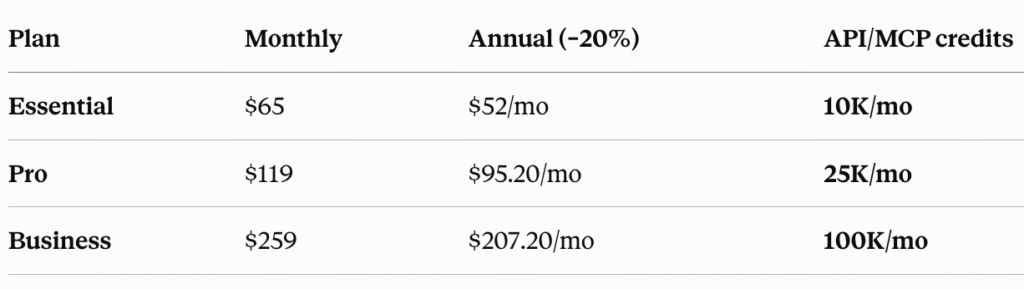
If you don’t want a subscription. You can go with $50 for 250k credits pay-as-you-go.
2. Google Search Console MCP (mcp-gsc): Best Free SEO MCP
Link: https://github.com/AminForou/mcp-gsc
Best for: Solo consultants and small teams who want first-party data for $0.
Google doesn’t have an official GSC MCP server. The available options are community-built and open-source. Developer Amin Foroutan built it.
It connects your Google Search Console account with AI tools like Claude, Cursor, Codex CLI, and Gemini CLI. You can ask questions about your search performance without exporting CSVs or searching through multiple GSC reports.
You get 20 tools covering search analytics, URL inspection, sitemaps, and property management. It also ships 4 ready-made skills through the Cursor Marketplace for the jobs you run most often.
What it can do:
- Check clicks, impressions, CTR, and average position.
- Analyze performance by query, page, country, device, and date.
- Compare two time periods to see what improved or dropped
- Spot keyword cannibalization between pages.
- Find keywords sitting at positions 11–20 for quick-win opportunities.
- Find pages with high impressions but low CTR.
- Inspect up to 10 URLs at once for indexing and crawl issues.
- View, submit, and check sitemaps for eros.
- Build quick SEO reports straight from your GSC data.
Ready-made skills
- seo-weekly-report — 28-day performance summary with period-over-period comparison.
- cannibalization-check — finds queries where multiple pages compete and suggests which to keep.
- indexing-audit — batch-inspects your top 20 pages and returns a prioritised fix list.
- content-opportunities — surfaces position 11–20 queries with high impressions and low CTR.
How to set it up?
- Create OAuth credentials in Google Cloud Console, enable the Search Console API, and download the JSON file. Save it somewhere permanent.
- Install uv with one command: curl -LsSf https://astral.sh/uv/install.sh | sh
- Add the server to your AI client’s config file, pointing at your credentials JSON.
- Fully quit the app and reopen it. A browser window opens once for sign-in, then the token is cached.
- Test it by asking “List my GSC properties.”
Pros
- Free and open source (MIT).
- Canonical ranking data straight from Google.
- Works with Claude Desktop, Cursor, Codex CLI, Gemini CLI, and Antigravity.
- No cloning or virtual environments needed with the uvx install.
- Destructive actions (delete site, delete sitemap) are off by default.
- Actively maintained, last updated July 2026.
Cons
- Not an official Google product.
- Google Cloud credential setup is the slow part, budget 10–15 minutes.
- Only works with your own GSC data.
- No competitor, backlink, or keyword research data.
- Limited to GSC’s 16-month historical window.
3. DataForSEO MCP: Best SEO MCP for builders and raw data
Best for: SaaS founders and dev teams who want raw SEO data with cost control.
DataForSEO works more like a raw SEO data layer than a ready-made SEO platform.
It’s built differently from most SEO MCPs. Instead of one tool per endpoint, it ships 4 tools: three for browsing DataForSEO’s API docs and one for making the call. Your assistant reads the docs, finds the right endpoint, then queries it. That gets you every endpoint without filling your client’s tool list, though unfamiliar requests take a few extra steps.
Setup is a URL. Point your client at https://data.dataforseo.com/v3/mcp and sign in with OAuth, with no API keys to manage. It’s also open-source TypeScript if you’d rather self-host on Docker or Cloudflare Workers.
What it can do:
- Pull real-time SERP data from Google, Bing, Yahoo, and DuckDuckGo.
- Find keywords and search volume data.
- Analyze backlinks and anchor text.
- Run on-page and technical SEO checks.
- Analyze domains and competitors.
- Access DataForSEO Labs data.
- Pull local search and Google Business Profile data.
- Track brand mentions across LLMs.
- Collect AI model responses at scale.
- Build custom SEO dashboards and tools.
How to set it up?
- Create your DataForSEO account and add credits.
- Add https://data.dataforseo.com/v3/mcp to your MCP client config.
- Sign in with OAuth when prompted, then start querying.
To self-host instead, run npx dataforseo-mcp-server@latest (Node.js 20+) and point your client at http://localhost:3000/mcp.
Pros:
- Pay only for the data you use, no fixed subscription.
- Hosted option with OAuth, no API keys to manage.
- Reaches every endpoint without hitting client tool limits.
- Field configuration trims responses per endpoint to control credit spend.
- Free spend monitoring and budget limits in the account panel.
- Open-source, with Docker and Cloudflare Workers deployment.
Cons:
- No free tier, $50 minimum deposit to start.
- Raw data only, no dashboard or reporting layer.
- The docs-then-request pattern costs extra round trips.
- Usage needs monitoring on high-volume workflows.
- Better suited to technical teams than beginners.
DataForSEO Pricing
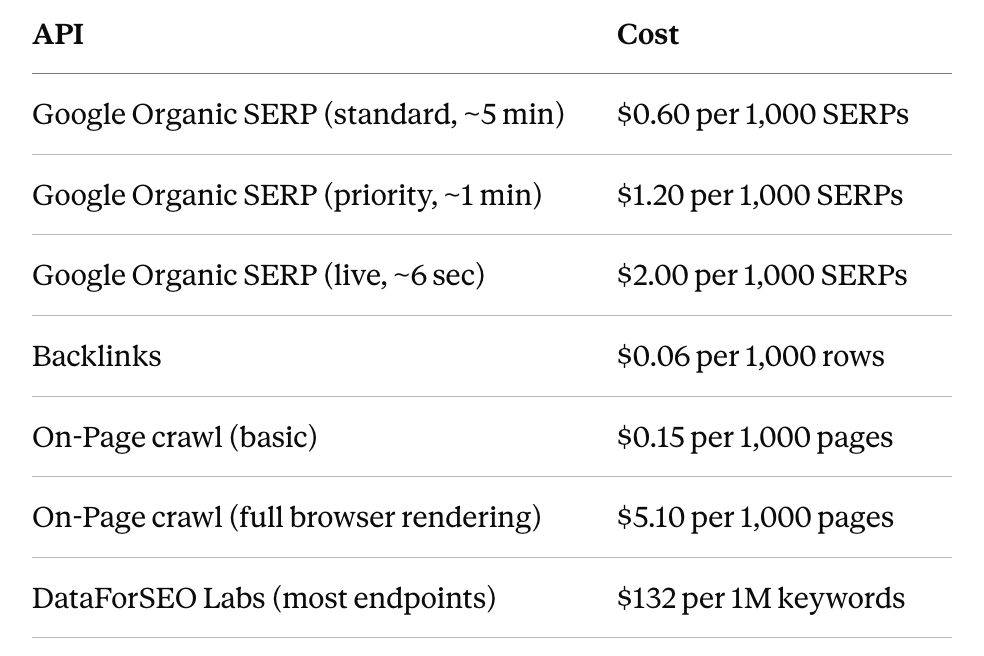
Pay-as-you-go with a $50 minimum deposit and no monthly fee. You’re billed per request, and prices vary by API and how fast you want results.
4. SEOptimer MCP: Best SEO MCP for fast audits
Best for: Agencies running client pitches who need a quick technical audit.
SEOptimer MCP server lets you run SEO audits directly inside your AI assistant. You can audit a website, get the results, and ask follow-up questions without switching between tools.
It runs 100+ checks in around 20 seconds, so it’s fast enough to use live in front of a prospect. Each audit covers on-page SEO, GEO visibility, rankings, backlinks, Core Web Vitals, page speed, mobile rendering, local SEO basics, and the site’s tech stack.
One thing to know upfront: MCP access is limited to the White Label and Embedding plans. The entry-level DIY plan doesn’t include it.
What it can do:
- Run a full SEOptimer audit on any URL from your chat, including competitor sites.
- Ask follow-up questions about the results instead of reading a static report.
- Get issues grouped and prioritised into an action plan.
- Review on-page SEO, Core Web Vitals, mobile usability, and technical issues.
- Pull audit results straight into your AI chat.
- Track every MCP call in the dashboard Request Log, with input parameters, timestamps, status, and a link to each report.
How to set it up?
- Sign up for a White Label or Embedding plan and find your API key under the API section of your dashboard.
- In Claude, go to Settings > Connectors and add a new connector.
- Enter the URL https://mcp.seoptimer.com/mcp?key=YOUR_API_KEY, replacing the placeholder with your key.
- Save, then test with “Audit www.example.com“.
Setup is documented for Claude. Since it’s a remote URL connector, it should work with other MCP clients that accept a server URL.
Pros:
- Very fast, with 100+ checks in about 20 seconds.
- One-URL setup, no local install or config files.
- 50 API credits included each month on qualifying plans.
- Request Log tracks every call for client billing and auditing.
- Cheapest entry point of the paid options here at $39/month.
Cons:
- Gated to White Label and Embedding plans, so the $29 DIY tier can’t use it.
- Audit only. No keyword research, backlink, or rank tracking data through the MCP.
- No AI visibility tracking through the MCP (GEO audits are a separate $29/month product).
- 50 credits a month is thin for heavy prospecting, so you’ll likely need the $100/month API plan.
- Your API key sits in the connector URL as a query parameter.
SEOptimer MCP Pricing
MCP is included on two plans, both with a 14-day free trial
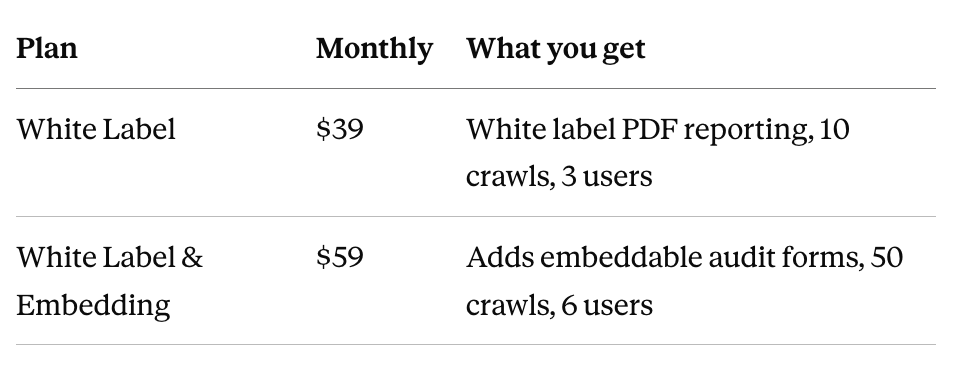
Both include 50 free API credits per month for MCP use. The DIY plan at $29 does not include MCP.
If you need more volume, the separate SEO Audit API runs $100/month for 500 reports.
5. Google Analytics MCP: Best SEO MCP for traffic and conversions
Best for: Teams who want GA4 insights without switching tabs.
Google Analytics MCP connects your GA4 data with AI tools like Claude Code and Gemini CLI. You can ask questions in plain language and get answers from your analytics data without digging through reports.
It’s built by Google, in the official googleanalytics GitHub org, and it’s free. It ships 7 tools running on the Analytics Admin API and Analytics Data API, covering standard reports, funnel reports, and realtime data.
Note: It’s marked experimental, so expect the tool surface to change.
What it can do:
- Check traffic, sessions, and user trends.
- Find your top-performing pages and products.
- Break down traffic by channel and source.
- Track organic traffic and conversions.
- Build funnel reports to see where users drop off.
- Pull realtime data on who’s on your site right now.
- Compare landing page performance.
- Spot pages getting traffic but not converting.
- Query custom dimensions and metrics from your property.
- Answer custom questions using your GA4 data.
How to set it up?
- Install pipx and the gcloud CLI.
- Enable the Google Analytics Admin API and Google Analytics Data API in your Google Cloud project.
- Run gcloud auth application-default login with the read-only analytics scope, then copy the credentials path it prints.
- Add the server to your client, pointing at that credentials file and your project ID.
- Test it by asking what the analytics-mcp server can do.
For Claude Code, step 4 is a single claude mcp add analytics-mcp command. For Gemini, it’s a block in ~/.gemini/settings.json.
Pros:
- Official Google project, using first-party GA4 data.
- Free to use.
- Funnel and realtime reporting, not just standard reports.
- Read-only scope, so it can’t change your GA4 configuration.
- Plain-language querying over your own property.
Cons:
- Setup is the heaviest here. It needs pipx, the gcloud CLI, a Google Cloud project, and two APIs enabled.
- Local only, with no hosted option.
- Documented for Claude Code and Gemini, so other clients need manual config.
- Experimental, with no stability guarantee on the tools.
- Analytics only. No keyword, backlink, rank, or SERP data.
Google Analytics MCP Pricing
Free. The server is open source and the Google Analytics APIs it uses are free within Google’s standard quotas. You’ll need a Google Cloud project to hold the credentials, but nothing here bills you.
6. Coupler.io MCP: Best SEO MCP for combining data sources
Best for: Marketing teams pulling SEO data next to ads, CRM, and revenue.
Coupler.io MCP connects your business data with AI assistants. It supports 437 data sources, so you can ask questions across SEO, ads, CRM, and finance data in one conversation without SQL.
It works differently from the other tools here. Coupler.io is an ETL platform first, so the MCP queries data flows you’ve already built rather than hitting sources live. You set up a flow once, then your assistant reads from it. That’s what makes cross-source analysis work, and it’s also why setup takes longer than pasting a URL.
It connects to Claude, ChatGPT, Cursor, Gemini, Perplexity, Copilot, and OpenClaw, plus a custom MCP option.
What it can do:
- Query GSC and GA4 data using plain English.
- Connect data from 437 business apps.
- Combine SEO, ads, sales, and finance data in one workflow.
- Compare organic traffic against PPC spend and revenue.
- Analyze large datasets without hitting your assistant’s context limit.
- Generate reports and dashboards from 220+ templates.
- Query across multiple data flows in one conversation.
- Work with uploaded CSV files.
How to set it up?
- Create your Coupler.io account and pick a plan that includes MCP.
- Build a data flow with the sources you want to query.
- Open the MCP integration settings and copy your endpoint URL and access token.
- Add both to your AI client.
- Restart the client and start querying.
Coupler.io says setup takes about 5 minutes once your data flows exist. Building the flows is the real work.
Pros:
- 437 data sources, all included on every plan.
- Genuine cross-source analysis, which no other tool here does.
- No-code setup, with no SQL required.
- Handles large datasets without context window limits.
- Works with seven AI clients, more than anything else in this roundup.
- SOC 2 Type II, GDPR, and HIPAA compliant.
Cons:
- You have to build data flows before the MCP is useful. It isn’t connect-and-ask.
- Likely needs a higher-tier plan, so confirm which one before committing.
- Not an SEO tool. It surfaces SEO data you already have, and adds no keyword, backlink, or SERP data of its own.
- Value depends entirely on which sources you connect.
- The free plan is too limited to evaluate it properly at 1 source and 100 rows per run.
Coupler.io MCP Pricing
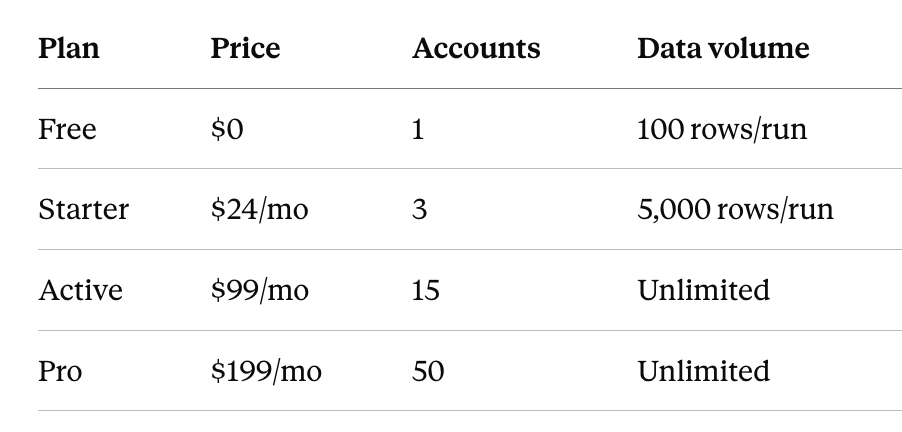
Plans are billed annually, with 25% off versus monthly
7. Semrush MCP: Best SEO MCP for competitive intelligence
Best for: Enterprise teams and large agencies doing market research with SEO.
Semrush MCP connects your Semrush account with ChatGPT, Claude, Gemini, Perplexity, Cursor, VS Code, and Claude Code. You can ask SEO questions in plain English and get answers from live Semrush data.
It’s an official app in the ChatGPT, Claude, and Perplexity marketplaces, so for those three you connect it from the app directory and authorize with OAuth. Access is read-only.
What it can do:
- Find low-competition keywords with search volume and difficulty.
- Compare competitors and their keyword overlap.
- Pull backlink profiles, referring domains, and anchor text distribution.
- Check domain authority scores and backlink quality metrics.
- Analyze paid search data, including CPC values and ad copy.
- Break down traffic by source, geography, and audience.
- Find page-2 keywords that could be pushed higher.
- Track keywords moving up or down.
- Set up recurring monitoring for competitor activity and ranking shifts.
Traffic Analytics and market data need a separate Trends API plan.
How to set it up?
- Subscribe to Semrush One Starter or Pro+, or SEO Classic Pro or Guru.
- In ChatGPT, Claude, or Perplexity, install Semrush from the app marketplace. For Cursor, VS Code, Gemini, or Claude Code, add it in the client’s MCP settings.
- Authorize with OAuth or an API key, then start asking questions.
Pros:
- Official Semrush integration with live data.
- Works with seven AI clients, one-click install on three.
- Broadest data coverage here: keywords, backlinks, paid search, and traffic.
- Read-only, so nothing in your account can be modified.
- Recurring monitoring workflows, not just one-off queries.
Cons:
- Most expensive entry point in this roundup at $165.17/month annually.
- Traffic Analytics and market data need a separate Trends API plan.
- No published per-query unit cost, so burn rate is hard to predict.
- Going past 50,000 units means a plan upgrade and a units package.
- Only worth it if Semrush is already your platform.
Semrush MCP Pricing
No separate MCP subscription. Eligible plans are Semrush One Starter or Pro+, and SEO Classic Pro or Guru. The base SEO plan at $117.33/month does not include MCP.
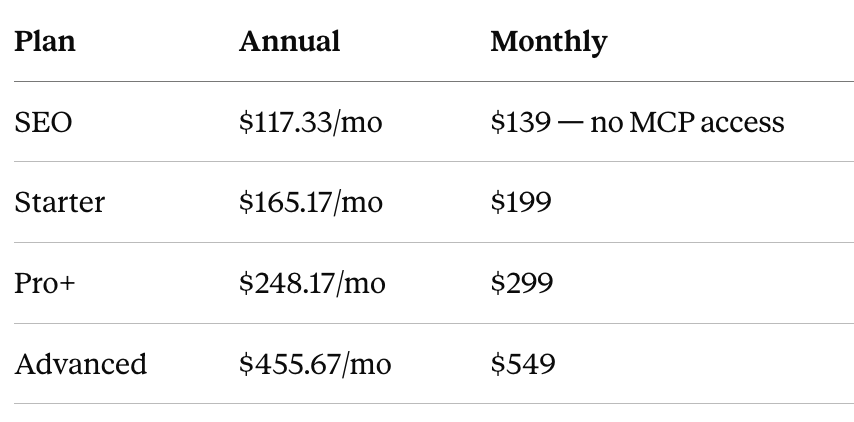
Eligible plans include 50,000 MCP API units per billing cycle, refreshing on your renewal date. Semrush One Starter, Semrush One Pro+, SEO Classic Pro, and SEO Classic Guru all qualify.
For more than 50,000, you move to Semrush One Advanced or SEO Classic Business and buy a units package on top. Packages come in 2M, 5M, 10M, and 20M units.
8. Ahrefs MCP: Best SEO MCP for backlinks
Best for: Link-building agencies and anyone whose strategy runs on backlinks.
Ahrefs MCP connects your Ahrefs account with ChatGPT, Claude, Copilot Studio, n8n, and six other AI tools. It’s the official hosted server, so there’s no local setup. You sign in with OAuth and your connection syncs across every device on your account.
Behind it sits Ahrefs’ index of 35 trillion backlinks across 456.5 billion pages, which is the reason to pick this one for link work.
What it can do:
- Analyze backlink profiles, referring domains, anchors, and link velocity.
- Compare DR charts across a list of competitors.
- Find trending keywords with volume, traffic potential, and difficulty.
- Compare competitor organic traffic and growth over time.
- Run Site Audit projects and pull issues and page content.
- Query Google Search Console keywords, pages, and performance history.
- Pull Web Analytics data by source, geography, device, and page.
- Track brand mentions through Brand Radar.
- Batch-analyze multiple targets in a single request.
How to set it up?
- Subscribe to Ahrefs Lite or above.
- Add the Ahrefs connector in your AI client. Ahrefs publishes setup guides for Claude Web, Desktop, Mobile and Code, ChatGPT, Copilot Studio, n8n, Lovable, Manus, Mistral’s Le Chat, and OpenClaw.
- Approve the consent screen. A dedicated API key tagged with MCP scope appears in your account.
Ahrefs ships more tools than some clients will accept. If yours caps the number, add ?tools=essentials to the server URL for a curated set, or name the groups you want from the 19 available.
Pros:
- Largest backlink index of anything here, at 35 trillion links.
- Hosted, with OAuth and no local setup.
- Setup guides for ten AI clients, the widest support in this roundup.
- Tool filtering means you never hit your client’s tool cap.
- Per-key monthly unit limits for cost control.
- Includes GSC and Web Analytics data alongside Ahrefs’ own.
Cons:
- Expensive, starting at $129/month.
- No free trial, and Ahrefs states it never discounts.
- The 100-row cap on Lite is restrictive for the backlink work this tool is best at.
- Not permitted for custom scripts or bridges, so use the public API if you’re building something.
- The $29 Starter plan can’t use MCP at all.
Ahrefs MCP Pricing
MCP is included on Lite and above. The $29 Starter plan does not include it.
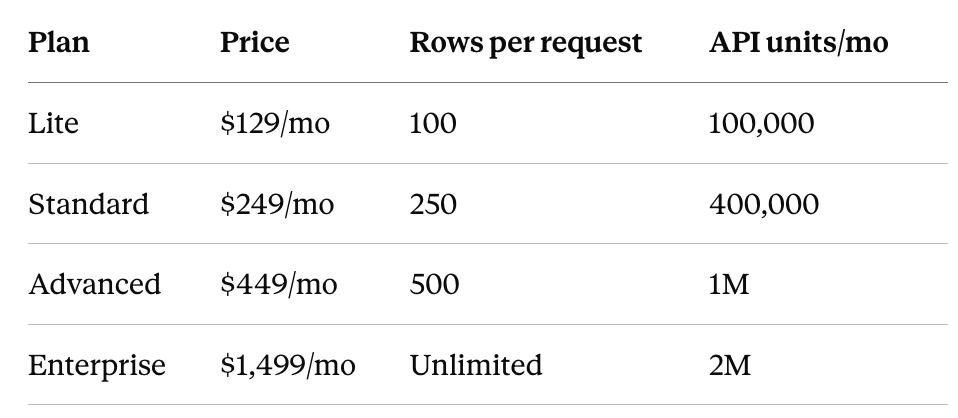
Lite returns only 100 rows per request, which is thin for a real referring-domain audit, so Standard is the realistic floor for serious backlink work.
Which SEO MCP should you pick
Most teams end up running two or three servers, not one. Each covers a different gap, and they work fine side by side in the same chat.
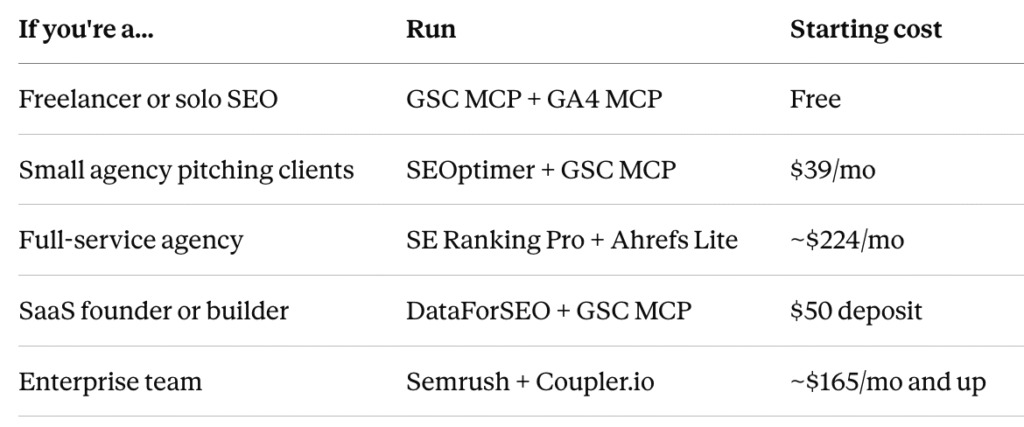
The logic behind each: the free pair covers your own search and traffic data but nothing about competitors. Adding SEOptimer gets you fast audits to pitch with. SE Ranking plus Ahrefs covers broad SEO and GEO research alongside the deepest backlink index. DataForSEO gives builders raw data at per-call pricing. Semrush plus Coupler.io puts competitive intelligence next to your ads and revenue data.
Is it worth the cost?
For most teams, yes, if you pick the right one. A report that takes two hours by hand can take a few minutes through an MCP. Do that daily and the hours add up.
You don’t need to start expensive. GSC and GA4 are free, and paid options start at $39/month. Begin with a free or cheap server, and upgrade once you know which data you’re actually reaching for.
If you manage several clients or bill by the hour, the value shows up fast. For a single small site, the free pair is often enough.
Are there risks with SEO MCP servers?
Yes, there are a few things you should keep in mind:
- Data privacy. You’re giving an AI tool access to your SEO data. Check what each MCP can reach before you connect it.
- Too much access. Most of the servers here are read-only by default, including GSC, GA4, Semrush, and Ahrefs. The exception is anything you deliberately enable, like GSC MCP’s destructive tools, which are switched off unless you turn them on. Leave them off unless you need them.
- API costs. Several charge per query. Ahrefs, Semrush, and SE Ranking all meter usage, and a few broad prompts can eat a month’s credits. Set a unit cap where the tool offers one.
- Wrong answers. AI can misread your data or pick the wrong endpoint. Check anything important before acting on it.
MCPs save real time, but you should still control what they reach and verify the decisions that matter.
SEO MCP FAQ
1. Are SEO MCP servers free?
Some are. GSC and GA4 MCPs are free. Paid ones start at $39/month.
2. Do MCP servers work with ChatGPT?
The paid ones do, including SE Ranking, Semrush, Ahrefs, and DataForSEO. The free GSC and GA4 servers run locally, so they only work in desktop apps.
3. Can you run multiple MCP servers at once?
Yes, most teams run two or three. Name the tool in your prompt so the assistant knows which one to call.
4. Do you need coding skills to set one up?
Not for the hosted ones. You paste a URL and sign in. Only GSC and GA4 need a terminal.
5. What happens when you run out of credits?
Queries stop working until your allowance resets. You can buy more units on most plans.
6. Do MCP servers replace traditional SEO tools?
No. You still pay for the tool underneath. MCP just lets you query it through chat instead of dashboards.
7. Do MCP servers cover Google AI Overviews?
Some do. SE Ranking tracks keywords with AI Overviews and Google AI results as part of its AI search toolkit, and Ahrefs covers AI visibility too. The free servers don’t.
Read More About:
10 Best Profound Alternatives In 2026
9 Best AI Visibility Tools In 2026